Defense in Depth - Building a Secure File Upload Service with Spring Boot

File upload functionality is a requirement for almost every modern application, but it is also one of the most dangerous attack vectors. From malicious scripts disguised as images to ransomware payloads, accepting files from users requires a Defense in Depth strategy.
In this post, I will walk you through a robust, cloud-agnostic file upload service I built using Spring Boot. This isn't just a "Hello World" S3 uploader; it includes MIME type detection, virus scanning, database encryption, and secure retrieval.
The Architecture
The goal was to create a system that is:
- Secure by Design: Never trust user input.
- Cloud Agnostic: Switch between AWS S3 and Azure Blob Storage via configuration.
- Privacy Focused: Encrypt sensitive metadata in the database.
Let's break down the layers of defense.
The Infrastructure (Docker)
Before we touch Java code, we need infrastructure. To perform real-time virus scanning without installing heavy software on the host machine, we use ClamAV running in a Docker container.
Here is the docker-compose.yml setup used to support this service:
services:
  clamav:
    image: clamav/clamav
    ports:
      - "3310:3310"
In our application.yml, we configure the application to talk to this daemon:
clamav:
  host: localhost
  port: 3310
Layer 1: True File Type Detection (Magic Bytes)
A common mistake is trusting file.getContentType() or the file extension.
The file extension is just a label. If I take a malicious executable named ransomware.exe and rename it to vacation.png, the operating system might treat it like an image, and a naive backend validator checking if (filename.endsWith(".png")) will let it right through.
To prevent this, we need to ignore the label and look at the content.
What are "Magic Bytes"?
Every file format has a unique "digital fingerprint" located at the very beginning of the file. These are called Magic Bytes (or File Signatures).
Imagine opening an image file not in a photo viewer, but in a Hex Editor. This is what the raw binary data looks like:
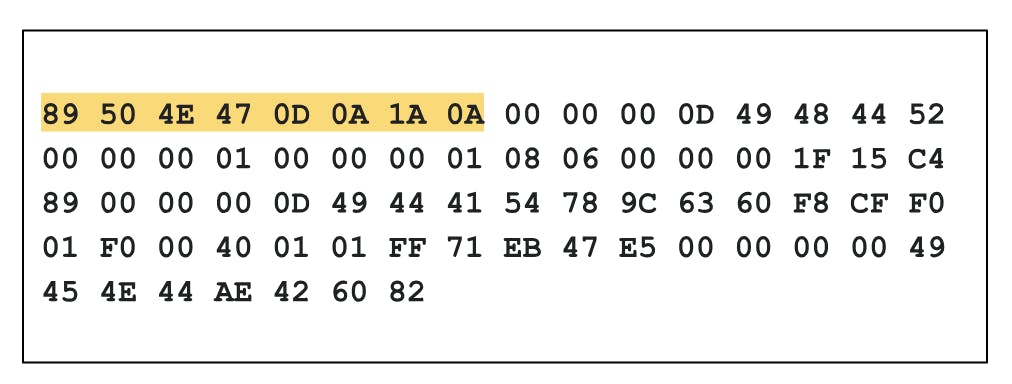 (Figure: A PNG file opened in a Hex Editor. Notice the first bytes on the top left.)
The first few bytes tell the computer exactly how to interpret the zeros and ones that follow.
Common Signatures
Here is a breakdown of the hex signatures for the file types we allow in this application:
| File Type | Extension | Magic Bytes (Hex) | ASCII Representation |
|---|---|---|---|
| PNG Image | .png |
89 50 4E 47 0D 0A 1A 0A |
.PNG.... |
| JPEG Image | .jpg |
FF D8 FF |
ÿØÿ |
| PDF Document | .pdf |
25 50 44 46 |
%PDF |
| ZIP / JAR | .zip |
50 4B 03 04 |
PK.. |
How we implemented it
Instead of writing complex byte-matching logic ourselves, I leveraged Apache Tika. Tika acts like a programmatic Hex Editor. It opens the stream, reads those first few bytes, compares them against a massive database of known signatures, and tells us the true MIME type.
The Validator Service:
@Component
public class FileValidator {
    private final Tika tika = new Tika();

    public void validate(MultipartFile file, List<String> allowedTypes) throws IOException {
        // 1. Detect the actual type from the Input Stream
        String detectedType = tika.detect(file.getInputStream());

        // 2. Compare against whitelist
        if (!allowedTypes.contains(detectedType)) {
            throw new StorageException(StorageException.CloudStorageExceptionType.INVALID_FILE_TYPE);
        }
    }
}
Instead of cluttering the Controller with validation logic, I created a custom Jakarta Validation annotation @ValidFile.
@Target(ElementType.PARAMETER)
@Retention(RetentionPolicy.RUNTIME)
@Constraint(validatedBy = FileValidatorConstraint.class)
public @interface ValidFile {
    String message() default "Invalid file type";
    Class<?>[] groups() default {};
    String[] allowedTypes(); // Configurable allowed types
}
The logic is handled by a ConstraintValidator, which Spring executes automatically before the method is entered:
@Component
public class FileValidatorConstraint implements ConstraintValidator<ValidFile, MultipartFile> {

    private final FileValidator fileValidator;

    @Override
    public boolean isValid(MultipartFile file, ConstraintValidatorContext context) {
        try {
            // Reusing the Tika logic here
            fileValidator.validate(file, this.allowedTypes);
            return true;
        } catch (Exception e) {
            return false;
        }
    }
}
Now, the controller is incredibly clean:
@PostMapping(value = "/upload", consumes = MediaType.MULTIPART_FORM_DATA_VALUE)
public ResponseEntity<DocumentDto> uploadFile(
        @RequestPart("file")
        @ValidFile(allowedTypes = {
                MimeTypeConstants.APPLICATION_PDF,
                MimeTypeConstants.IMAGE_JPEG,
                MimeTypeConstants.IMAGE_PNG
        }) MultipartFile file) {
    return ResponseEntity.ok(documentService.save(file));
}
Layer 2: Malware Scanning
Even a valid PDF can contain a virus. Before any file is persisted to our cloud storage, it passes through an antivirus check using ClamAV.
I set up a dedicated VirusScanService that pipes the file stream directly to a ClamAV daemon (running in Docker) before upload.
@Service
@RequiredArgsConstructor
@Slf4j
public class VirusScanService {

    private final ClamavClient clamavClient;

    public void scan(InputStream inputStream) throws StorageException {
        ScanResult result = clamavClient.scan(inputStream);

        if (result instanceof ScanResult.VirusFound) {
            log.warn("Security Alert: Virus detected in uploaded file.");
            throw new StorageException(
                StorageException.CloudStorageExceptionType.FILE_CONTAINS_VIRUS
            );
        }
    }
}
Layer 3: Cloud Agnosticism (Strategy Pattern)
I didn't want the codebase tightly coupled to AWS. I used the Strategy Pattern with Spring's @ConditionalOnProperty to load the correct adapter at runtime.
The Interface
public interface Storage {
    Blob uploadFile(MultipartFile file);
    String generatePresignedUrl(String blobName, String contentType);
    void deleteFile(String key, String contentType);
}
Configuration-Based Loading
In application.yml, simply changing cloud.storage.provider switches the entire backend implementation without changing a single line of business logic.
cloud:
  storage:
    provider: azure # or 'aws'
The adapters (like AwsStorageAdapter and AzureStorageAdapter) handle the provider-specific logic, such as determining the correct container/bucket (images vs files) and handling credentials.
Aws Implementation
@Component
@ConditionalOnProperty(name = "cloud.storage.provider", havingValue = "aws")
public class AwsStorageAdapter implements Storage {}
Azure Implementation
@Component
@ConditionalOnProperty(name = "cloud.storage.provider", havingValue = "azure")
public class AzureStorageAdapter implements Storage {}
Layer 4: Data Privacy (Jasypt Encryption)
Storing file metadata (like file names or paths) in plain text can be a privacy issue. I utilized Jasypt and JPA AttributeConverter to automatically encrypt sensitive columns.
The Crypto Converter
This converter runs automatically whenever a Document entity is saved or retrieved.
@Converter
public class StringCryptoConverter implements AttributeConverter<String, String> {

    private final StandardPBEStringEncryptor encryptor;

    public StringCryptoConverter(Environment env) {
        this.encryptor = new StandardPBEStringEncryptor();
        this.encryptor.setPassword(env.getProperty("jasypt.encryptor.password"));
        this.encryptor.setAlgorithm("PBEWithMD5AndDES");
    }


    @Override
    public String convertToDatabaseColumn(String attribute) {
        return encryptor.encrypt(attribute); // Encrypts before writing to DB
    }

    @Override
    public String convertToEntityAttribute(String dbData) {
        return encryptor.decrypt(dbData); // Decrypts when reading from DB
    }
}
The Entity
Notice how clean the entity looks. The business logic doesn't know encryption is happening.
@Entity
@Table(name = "documents")
public class Document {

    @Column(name = "file_name", nullable = false)
    @Convert(converter = StringCryptoConverter.class) // <--- Automatic Encryption
    private String name;

    @Column(name = "file_key", nullable = false)
    @Convert(converter = StringCryptoConverter.class)
    private String key;
}
Layer 5: Secure Delivery (Pre-signed URLs)
Finally, we never make our S3 Buckets or Azure Containers public. Public buckets are the #1 cause of data leaks.
Instead, when a user requests a file, we generate a Pre-signed URL (AWS) or SAS Token (Azure). This URL is valid for a short time (e.g., 30 minutes) and grants read-only access to that specific file.
@Component
@RequiredArgsConstructor
@ConditionalOnProperty(name = "cloud.storage.provider", havingValue = "aws")
public class AwsStorageAdapter implements Storage {

    private final S3Presigner s3Presigner;
    private final AwsS3BucketProperties awsS3BucketProperties;

    public String generatePresignedUrl(String objectKey, String contentType) {
        var bucketName = awsS3BucketProperties.s3().bucketName();
        // Create a GetObjectRequest with the bucket name and object key
        GetObjectPresignRequest presignRequest =
                    GetObjectPresignRequest.builder()
                            .signatureDuration(Duration.ofMinutes(accessUrlDurationInMinutes))
                            .getObjectRequest(req -> req.bucket(bucketName).key(objectKey))
                            .build();

        // Use the S3Presigner to generate a presigned URL
        PresignedGetObjectRequest presignedGetObjectRequest =
                        s3Presigner.presignGetObject(presignRequest);

        return presignedGetObjectRequest.url().toString();
    }
}
@RequiredArgsConstructor
@Component
@ConditionalOnProperty(name = "cloud.storage.provider", havingValue = "azure")
public class AzureStorageAdapter implements Storage {

    private final BlobServiceClient blobServiceClient;

    public String generatePresignedUrl(String blobName, String contentType) {

        BlobClient blobClient =
                blobServiceClient.getBlobContainerClient(containerName).getBlobClient(blobName);

        // Define permissions (Read only)
        BlobSasPermission permission = new BlobSasPermission().setReadPermission(true);

        // Define Expiry (Now + 30 mins)
        OffsetDateTime expiry = OffsetDateTime.now().plusMinutes(30);

        // Generate Signature
        String sasToken = blobClient.generateSas(new BlobServiceSasSignatureValues(expiry, permission));

        return String.format("%s?%s", blobClient.getBlobUrl(), sasToken);
    }
}
Conclusion
Building a secure file upload service requires more than just handling multipart requests. By layering Type Validation, Virus Scanning, Encryption, and Secure Access Patterns, we ensure that our application remains secure and our user data remains private.
You can find the full source code, including the Docker configuration for ClamAV and the LocalStack setup for testing, in the repository below.